In today’s digital world, customers want to access support quickly via their preferred communication channel. In response, more companies are looking to deliver seamless, personalized support experiences via omnichannel customer service models.
resolution times to overall customer satisfaction rates. In this guide, we’ll explore omnichannel customer service and its benefits, as well as break down how to build an omnichannel service strategy and tips for buying the right omnichannel platform.
Table of Contents
- What is omnichannel customer service?
- Omnichannel Customer Service vs. Multichannel Support
- Benefits of Omnichannel Customer Service
- Omnichannel Customer Service Platform Features
- Omnichannel Customer Service Strategy
- Omnichannel Customer Service Metrics and Governance
- How to Choose an Omnichannel Customer Service Platform
- Frequently Asked Questions About Omnichannel Customer Service
What is omnichannel customer service?
Omnichannel customer service is a service strategy designed to create a connected, consistent experience for customers across every communication channel, whether it’s email, live chat, phone, social media, or self-service experiences.
An omnichannel service model ensures that customer history, context, and key data are connected across channels. This approach gives support teams the full context they need to provide faster, more personalized service. Omnichannel service enhances the customer experience by removing the need for customers to repeat themselves and offering the flexibility of starting a conversation on one channel and continuing it on another.
Omnichannel Customer Service vs. Multichannel Support
While these terms are often used interchangeably, omnichannel customer service differs from multichannel support.
Multichannel customer service means a business simply offers support through multiple channels, but those channels may operate independently with their own inbox or ticketing queue. Multichannel service offers the convenience of multiple channels for support, but customers often need to repeat information and agents don’t have full conversation history and context when a customer switches channels.
Omnichannel customer service builds upon multichannel support by connecting those channels into a single, unified experience. In omnichannel service, customer conversations, purchase history, previous interactions, and other key context are shared across channels so that agents have a unified view of customer data and customers can continue their conversation without having to start over.
Most modern omnichannel customer service platforms consolidate support requests from each channel into a shared inbox or ticketing queue, giving agents a complete view of each customer’s history to help them continue conversations seamlessly.
Benefits of Omnichannel Customer Service
CX leaders who implement omnichannel customer service see tangible benefits for both their customers and their support teams. Here is a list of five key benefits of omnichannel customer service in more detail.
Reduces friction for customers.
According to research from Salesforce, 56% of customers have to re-explain their issue every time they’re transferred to a different person or department. Omnichannel customer service eliminates this friction point by preserving conversation history and customer context across every touchpoint, which reduces friction for the customer when they reach out for support. When context is carried across channels, customers can pick up where they left off and aren’t required to repeat themselves, resulting in a smoother support experience.
Enables faster, more efficient support.
When customer context, history, and account information are centralized in an omnichannel customer service platform, agents spend less time looking for previous interaction history and can instead jump right in to helping solve the customer’s problem.
With tools like HubSpot’s Smart CRM, agents have access to a unified customer record that is automatically enriched with data from emails, calls, and the web, giving them full context before every interaction.
A unified conversation timeline reduces context switching and information gathering for service agents. Agents can also better prioritize urgent issues and resolve requests more efficiently, which allows them to handle a larger volume of requests without compromising the quality of support.
Creates more personalized customer experiences.
Research shows that up to 82% of customers prefer companies to know who they are and anticipate their needs. Omnichannel customer service helps companies meet this need by giving agents a complete view of the customer, including previous purchases, past support interactions, and other key account context.
This type of data enables support agents to tailor their conversations and make personalized recommendations, creating a more meaningful interaction with customers and building trust along the way. When companies layer tools like customer agent into their omnichannel strategy, they can use customer data to personalize agent interactions with things like tailored content, special routing rules, and more.
Offers visibility into the entire customer journey.
An omnichannel customer service strategy gives organizations a more holistic picture of how their customers are interacting with them across every support channel. This removes the need to analyze each channel individually and instead allows customer support leaders to surface trends, identify bottlenecks, and spot areas of opportunity across the customer journey. This type of visibility helps CX teams improve workflows, optimize staffing, and quickly address customer pain points before they escalate into bigger issues.
Improves collaboration for support teams.
Working from a connected service platform with unified customer data makes customer handoffs between agents a seamless process. Whether a case is transferred or an agent is helping a customer that has switched channels, the receiving agent has immediate access to conversation history and context they need to jump in right away and start helping the customer.
The automatic transfer of important information reduces duplicate work, minimizes miscommunication, and ensures that key context isn’t lost in the handoff process between agents. Service Hub’s omnichannel platform features built-in CRM integration and AI-generated conversation and ticket summaries that make handoffs between reps, teams, and channels seamless.
Omnichannel Customer Service Platform Features
Having the right platform and features is critical to executing a great omnichannel strategy. Below is a list of key features that make a great omnichannel customer service platform.
Shared Inbox
A shared inbox, like HubSpot’s Free Shared Inbox for Customer Conversations, consolidates conversations from every channel into a single workspace. This unified view of customer requests allows agents to focus on monitoring one inbox instead of monitoring separate inboxes and applications across channels.
With a unified inbox, siloed communication between channels is eliminated, reducing the chance of duplicate or missed responses. Working from the same shared inbox fosters better collaboration between agents, helps with ticket prioritization, and gives customer service leaders better visibility into the queue health and agent capacity.
CRM Data Connection
Shared CRM data connects service interactions to one customer record, enabling agents to view data such as purchase history, subscription plan details, previous support tickets, and more. This gives agents complete customer context before they respond and allows them to offer quicker, more personalized support.
Intelligent Routing
Intelligent routing automatically sends conversations to the right person or team based on predefined rules or AI-surfaced insights. Routing can be set up to trigger based on product expertise, language, geography, account tier, or channel. AI can help prioritize customer routing based on customer intent, sentiment, or urgency.
When a platform can intelligently route conversations, customers have shorter wait times, tickets aren’t left unassigned, and first-contact resolutions improve by matching customers with the best agent to help them. Customer service leaders also benefit from more balanced workloads across the support team, and this feature helps maintain SLAs as ticket volume grows.
AI and Automation
Many omnichannel solutions leverage AI to summarize conversations, draft responses, classify or tag tickets, detect sentiment, recommend content, and automate repetitive tasks for human agents. Artificial intelligence can also power chatbots and AI agents that autonomously resolve issues for customers and surface trends and themes across the customer journey.
AI-powered omnichannel platforms like Service Hub help agents be more efficient by automating repetitive manual work. This accelerates resolution times and enhances satisfaction for customers.
Connected Knowledge Base
When a knowledge base is built into the omnichannel platform, organizations can easily surface relevant information to customers to help them solve their issues independently. Customer support teams also benefit from connected access to the documentation they need to resolve customer issues, such as FAQs, troubleshooting guides, and how-to articles.
Integrating a knowledge base into the omnichannel service platform means that customers can better self-service and human agents spend less time looking for documentation, improving response times and consistency across agent responses.
Pro tip: Platforms like Service Hub even have knowledge base agents that can turn successful service interactions into self-service content that lives in the knowledge base
SLA Management
For customer service teams, service level agreements (SLAs) are a critical metric that is tracked and measured regularly. Many omnichannel service platforms like Service Hub’s SLA Management can apply SLAs to tickets automatically and alert teams when an SLA deadline is at risk of being missed. SLA policies can be assigned based on predefined criteria such as the customer tier, ticket priority, issue type, or support channel.
When the platform recognizes that an incoming ticket meets specific SLA criteria, it automatically applies the correct SLA, begins tracking its progress, and alerts the right people where needed. This eliminates manual work for both customer service leaders and support agents, automates ticket prioritization, and helps standardize service delivery.
Data Analytics
Omnichannel service platforms include centralized dashboards and reports, like HubSpot’s Service Analytics, that allow customer service leaders to understand how response time, resolution time, customer satisfaction, and ticket volume are performing across channels as well as across the entire customer journey.
This type of cross-channel data helps companies quickly surface and address bottlenecks while also measuring team performance and forecasting staffing needs. Analytics can also reveal customer behavior and channel preferences, empowering companies to invest staffing and resources in the right places.
Security and Permissions
Security settings that safeguard customer and company data are critical for meeting compliance and regulatory requirements. Omnichannel platforms should offer the most up-to-date permission structure, including:
- Role- or team-based permissions.
- Single sign-on (SSO).
- Encryption.
- Audit logs.
- Data retention policies.
- Compliance certifications.
This helps protect customer information and reserves access to sensitive data. AI-powered platforms should also include data protection controls and transparent AI recommendations in order to protect company data while allowing support reps to understand how the AI reached its conclusions.
Omnichannel Customer Service Strategy
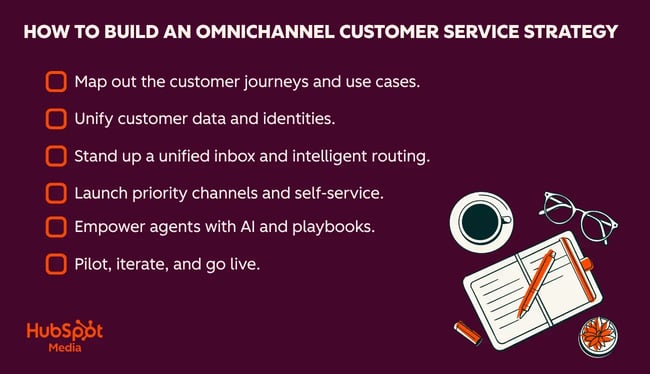
When implementing an omnichannel customer service strategy, it’s important to take a few foundational steps before expanding to new channels. Below is a step-by-step guide to launching an omnichannel customer service strategy.
Map out the customer journeys and use cases.
Mapping out the customer journey helps customer service leaders identify every touchpoint in the journey and the channels that customers prefer at each different stage. Customer service leaders should also document common support use cases to understand where customers experience the most friction and identify which interactions could be automated. Outlining the customer journey and common support use cases creates a foundation for each additional step in the omnichannel strategy.
CX pro tip: Don’t forget to include customer feedback in this process, as customers are usually quick to tell you where they are experiencing friction. For example, customers may be using one channel more than the others, but that might be because it’s the only channel that gets them through to a human. Consider feedback and all angles when building out this journey map.
Unify customer data and identities.
A successful omnichannel strategy relies on complete, unified customer data to connect across channels. Customer success leaders will need to integrate customer data into a centralized platform that connects conversations, purchase history, account information, support interactions, and other key customer context.
A unified customer profile enables agents to work faster and offer personalized support while allowing customers to move between channels without losing context. Platforms like Smart CRM can unify customer information, conversations, and tools to create a single customer record.
CX pro tip: Take the time to provide a talk track for your agents to use when they’re picking up a conversation that’s changed channels. This can help them feel more confident jumping into a new conversation if they have a practiced greeting and segue to use with the customer.
Stand up a unified inbox and intelligent routing.
Once customer data is connected, all support channel inquiries should feed into a shared inbox so that every conversation can be managed in a single workspace. Organizations will need to establish routing rules that automatically assign conversations based on factors like issue type, sentiment, customer tier, product expertise, or urgency. With a unified inbox and automated routing capabilities like those in Service Hub, support agents become more efficient and have better visibility into the overall support queue.
CX pro tip: Consider which customers you’d want to provide a different experience and use AI to help you achieve that. I’ve seen some companies set routing rules that fast-track certain customers to the front of the support queue, like those with the highest ARR or those who are at-risk but up for renewal in the next six months.
Launch priority channels and self-service.
Organizations should consider launching channels in a phased approach, starting with the channel that their customers prefer or use the most frequently. This is often email, live chat, and phone, but may also be messaging channels or social media, depending on the industry. Customer service leaders should also invest in self-service resources such as knowledge bases, FAQs, AI chatbots or agents, and customer portals, like HubSpot’s Customer Portal in Service Hub.
CS pro tip: Customer communities are another great way to help customers self-service, as they connect customers to each other and foster idea sharing. CSMs, support reps, and other internal team members can also create content and engage with customers in the community.
Empower agents with AI and playbooks.
A great omnichannel strategy uses AI to help make agents more effective, not to replace them. AI in omnichannel support supports intent detection, summarization, and suggested replies. AI can also surface relevant knowledge base articles, tag tickets, and automate repetitive tasks.
With omnichannel customer support automation, agents spend less time doing manual, time-consuming work and spend more time helping customers with complex problems that require a human touch. Customer service leaders should develop playbooks for common support procedures for each channel and include the escalation process, troubleshooting workflows, and communication guidelines. Be sure to also train the team on where AI is assisting them so they can provide feedback along the way.
CS pro tip: AI chatbots and agents are great ways to drive efficiencies with artificial intelligence. HubSpot’s AI tools can summarize conversations, automatically route customers to the right department, and assist human agents with tasks that help expedite resolution times.
Pilot, iterate, and go live.
Roll out an omnichannel strategy in phases instead of all at once. Begin a pilot with a limited scope, such as a few support channels, customer segments, or support teams. This enables CS leaders to monitor performance and quickly pivot if necessary.
CS leaders should also gather customer feedback and input from agents to identify improvement opportunities. Once workflows are refined and performance goals are being met, organizations can continue to roll out their omnichannel strategy across the organization.
Omnichannel Customer Service Metrics and Governance
Omnichannel customer service metrics should align to business outcomes and be trackable in customer service software. Below is a list of KPIs to track per channel, as well as a few suggested review cadences.
- First response time measures how long it takes for a customer to receive an initial reply after they contact support, which can help customer success leaders identify gaps in staffing, optimize routing rules, and ensure teams are meeting their SLA’s.
- Average resolution time tracks how long it takes to fully resolve a customer issue from start to finish, which often helps CS leaders identify bottlenecks or support workflows that need improvement.
- First contact resolution (FCR) measures the percentage of customer issues resolved during the initial interaction that didn’t require follow conversations or escalations. A high FCR rate typically shows that agents have the right information and resources to solve customer issues quickly. This is an especially helpful metric to track when launching self-service options such as AI chatbots or agents.
- Customer satisfaction (CSAT) measures how satisfied a customer is at the point of interaction, and can reveal whether certain channels, agents, or self-service options deliver a better or worse experience.
- Customer effort score (CES) measures the amount of effort a customer uses to interact with a company or its products, which can help CS leaders understand how difficult an existing process or workflow is.
- SLA compliance looks at how often support teams meet their response and resolution commitments, which helps service leaders ensure that customers are receiving consistent service while identifying where to invest resources into staffing, routing, or workflow improvement.
- Channel trends, like whether certain channels see a higher ticket volume or higher channel adoption.
- Self-service success means monitoring knowledge base article views, search success rate, self-service resolution rate, AI chatbot containment rate, and ticket deflection rate.
- Agent productivity measures the number of tickets handled per agent, average handling time, queue backlog, and agent utilization per channel and across channels. This can help service leaders understand if the omnichannel strategy is helping agents be more productive.
CS pro tip: I also suggest monitoring the AI feedback score on AI capabilities, which measures how often agents rate AI-generated recommendations, responses, or workflows as helpful. This type of feedback can help quickly identify areas to improve AI accuracy, which in turn helps maintain trust with the agents who are using the AI tools.
Metric Review Cadences
When customer service leaders regularly review omnichannel service KPIs, they proactively evaluate performance and stay ahead of issues. While most CS leaders are probably reviewing these metrics daily, below are a few common metric review cadences and the additional stakeholders that are often included in each review.
Weekly Operation Reviews
Weekly metric reviews focus on the day-to-day health of the overall support operation and often monitor operational metrics such as ticket volume, response and resolution times, SLA compliance, queue health, and agent workloads.
These meetings offer the opportunity to identify potential emerging issues as well as adjusting staffing and processes so that small problems don’t balloon into bigger issues. Weekly reviews usually include customer service managers or directors, support team leads, and CX or CS operations members.
Monthly Customer Journey Reviews
Monthly customer journey reviews are an opportunity to evaluate the end-to-end customer experience and look for improvement opportunities. These meetings are higher level than the weekly reviews and offer a broader look at how customers experience support across every channel. CS leaders should analyze customer feedback, CSAT and CES trends, self-service adoption, and channel performance for each part of the customer journey.
These insights can help improve content, optimize AI or workflows, and remove friction or barriers for customers. Monthly customer journey reviews usually include customer service leadership, customer experience leadership, customer education team members, and may also include representation from the digital experience or customer success team.
Quarterly Strategy and Roadmap Reviews
Quarterly reviews should focus on the long-term strategy to help CS leaders evaluate whether the omnichannel strategy is supporting broader business goals. Often attended by senior directors or VPs from customer service and customer success, the metrics in this cadence should reflect higher-level insights like long-term trends, overall performance, customer insights, and alignment on business priorities.
This kind of review helps the organization determine where investments should be made next, whether it’s expanding to new channels or implementing new AI-driven workflows to help human agents. CS leaders can present a roadmap with priorities and plans for evolving the omnichannel strategy over the next one to two quarters.
How to Choose an Omnichannel Customer Service Platform
When choosing an omnichannel customer service platform, think beyond feature checklists and instead assess how well the platform can support the customer experience strategy over time. Below are five questions that decision-makers can ask themselves to ensure they’re purchasing the best omnichannel service platform for their needs.
1. Does this platform support the channels my customers actually use?
The omnichannel platform must support the right channels for your customers. That includes the channel customers are already using the most, the channel customers prefer the most, and other desired communication channels that may be rolled out in the future. It’s also important to make sure the platform supports customers switching between all channels.
2. Will this platform give me a unified view of the customer?
Omnichannel strategies rely on unified data, so CS leaders should evaluate if the platform in question can connect customer conversations with CRM records, purchase history, help desk interactions, and other key business systems. It’s also important to make sure that agents will be able to quickly see that history when interacting with customers.
3. Will this platform scale with my business?
Make sure that the platform that’s chosen meets current needs while supporting future growth. Consider whether the platform supports increasing ticket volume, additional channels, larger teams, and evolving customer expectations. (And if it does support these, ask if there is a cost associated with supporting that growth.)
4. Does this platform provide the reporting and analytics we need?
If a platform lacks strong reporting and analytics, the job of a customer service leader becomes twice as hard. The benefit of an omnichannel platform is the ability to measure metrics across channels, so make sure that the platform in question can easily surface the metrics that the company cares about in a format that is actually usable (i.e. consider the ease of use for dashboards and data visualization tools).
5. Does this platform support our AI goals?
Most customer service platforms include AI, but CS leaders should evaluate whether the AI capabilities align with their overall support strategy. Consider which tasks are best suited for automation and ensure the platform in question provides high-quality AI output, strong data privacy protections, and appropriate AI governance.
Pro tip: Service Hub’s Omnichannel Customer Service makes it easy to scale support across channels, unify customer data, and leverage AI, automation, and analytics to gain key insights.
Frequently Asked Questions About Omnichannel Customer Service
How long does an omnichannel implementation usually take?
Many companies see omnichannel implementation take anywhere from a few weeks to several months, though timelines can vary depending on the organization’s size and the complexity of the tech stack. Starting with a smaller pilot and expanding over time can help organizations get started more quickly.
Should small teams invest in omnichannel now?
Yes, especially if customers are already reaching out for support across multiple channels. Many omnichannel service platforms are built to scale, making it easy for small teams to start with their existing channels and later expand to new channels as they grow.
Can I connect my existing one system and still go omnichannel?
Yes, since most omnichannel platforms integrate with popular software tools like CRMs, help desks, and other business tools, it’s possible to unify customer data even with one main system. Once customer data is unified, it’s possible to offer connected support experiences across multiple channels.
How do I keep AI helpful without creating new silos?
Customer service leaders should choose an AI-powered omnichannel platform that uses the same data, conversation history, knowledge base, and workflows that the support team uses. CS leaders should also regularly review AI recommendations and agent feedback to improve accuracy over time. This helps AI become another part of the omnichannel strategy instead of another disconnected tool.
Connected data is the foundation of omnichannel service.
Omnichannel customer service is more than just supporting customers across multiple channels. It’s about using customer context and history to deliver a more personalized, connected experience for customers. Building a successful omnichannel strategy requires preparation, the right technology, and a commitment to ongoing improvement.
Customer service leaders and CX managers looking to implement an omnichannel customer service strategy should consider Service Hub’s Omnichannel Customer Service features. With a unified data ecosystem, multi-channel support capabilities, and the ability to personalize experiences, Service Hub includes everything an organization needs to start or scale their omnichannel customer service strategy.